ABAP
-

22 ABAP Tips for Better Programming


ABAP tips and tricks for better programming. ABAP as such is a very simple programming language and it’s very easy to learn but there are certain things which determine…
-

SAP ABAP Tutorials for Beginners and Newbies
SAP ABAP is one of the easiest programming languages because it’s a 4GL language. That means ABAP language is very english like and easy to understand it. It’s so…
-

SAP LSMW Hands on – Step by Step Instructions
The LSMW (Legacy System Migration Workbench) is a free SAP-based tool that supports the one-time or periodic transfers of data from non-SAP systems to SAP. The LSMW can be…
-
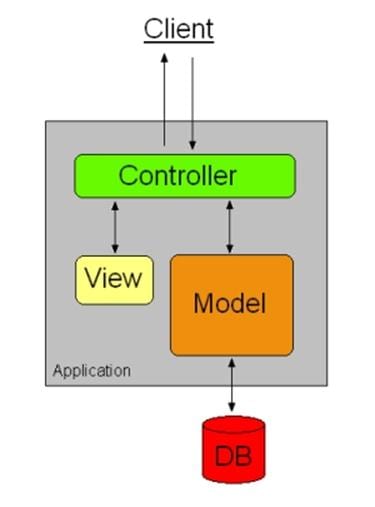
Web Dynpro In a Nutshell
Web Dynpro From a technological standpoint, SAP’s Web Dynpro for ABAP/Java is a ground-breaking measure in the development of internet-based user interfaces. It’s entirely unlike any design paradigm used…
-
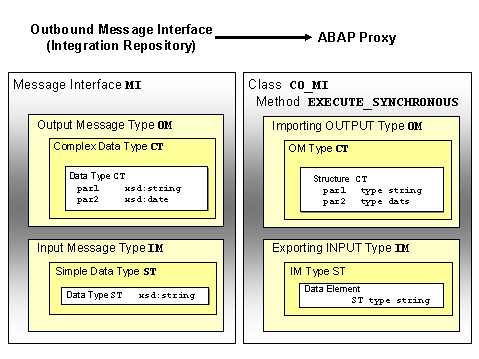
Interfacing using ABAP Proxy in SAP – End to End Guide
What is ABAP Proxy? ABAP Proxy is one of the most remarkable forms of communication between SAP application system and SAP PI. The proxy provides both asynchronous and synchronous…
-

Working with Internal Tables in SAP ABAP
While working with Internal tables you need to consider the following cases: You want to reorganize the contents of table. You want to modify few details of table and…
-

Creating a table in SAP ABAP
Here are the steps required to create a table in SAP ABAP. Step 1: Go to transaction SE11 and input a table name. Step 2: Involves setting up attributes…
-
How to Create a Program in SAP ABAP
You can navigate to the ABAP Editor through the Menu. You can also create favorites for certain transactions and put it into your custom menu. You can type SE38…
-
Introduction to ABAP Workbench
The ABAP Workbench is the integrated development environment available in SAP which allows for users to maintain ABAP objects such as Programs, Screens, Menus, Dictionary Objects (such as Tables,…
-

Parallel Cursor Method in SAP ABAP
ABAP Development Using Parallel Cursor Method Performance is a very important point in program building. ABAP include, with each new version released, improved sentences for data base accessing, new…
-
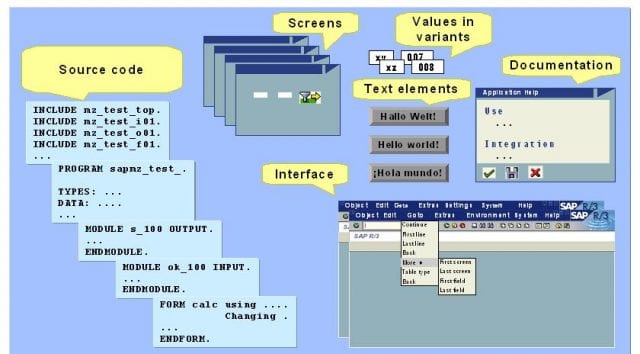
ABAP : Introduction for Beginners
ABAP Stands for Advanced Business Application Programming. ABAP is a programming language created and used by SAP for the development of application programs,including: Reports, Screens, Interfaces & Data conversions.…
-
ABAP Objects – Pros and Cons
ABAP Objects establishes a different level of data encapsulation. In procedural programming, the state of an application is held by global variables. In object-oriented programming, however, the state is…
-

ABAP Programming Language
The ABAP Programming language allows multi language applications which allows SQL Access so has been enhanced for use with object oriented language. It’s especially created for dialog-based business programs.…
-

ABAP Objects – Class and objects
What is Object Oriented Programming? Object oriented programming tries to map the real world objects with their attributes and methods as realistically as possible in program constructs. The aim…
-
ABAP Procedural Programming Drawbacks
SAP has come a long way from ABAP Procedural Programming to Object Oriented ABAP Programming. ABAP Procedural Programming Drawbacks Program Maintenance is complicated Difficulty in program management as program…
-
ALE IDOC Tutorial for ABAPers
The purpose of ALE IDOC is to help the ABAP Developers to get an idea on how to setup all the necessary configs needed to send and receive idocs.…
-

Working with BADI’s in SAP ABAP
What is BADI? BADI stands for Business Add-in. BADI’s are an enhancement concept which uses ABAP objects. Totally an object-oriented method to enhance classes, interfaces, methods. You need to…
-

Object Oriented ABAP (OOABAP) – FAQs
Here are some of the questions which you must know if you are good at object oriented programming in ABAP. 1. Priniples of oops? 2. What is difference between…
-
Understanding and Working with BAPI’s
Business API (BAPI) is the most important component of SAP Business Framework. BAPI enables SAP and third party applications to interact and integrate with each other at the Business…
-
Purpose of Modification Assistant
The Modification Assistant is the tool that offers you support when making modifications to the standard, by branching to a special modification mode whenever you are modifying objects from…