Purchase Requisition Quick Reference
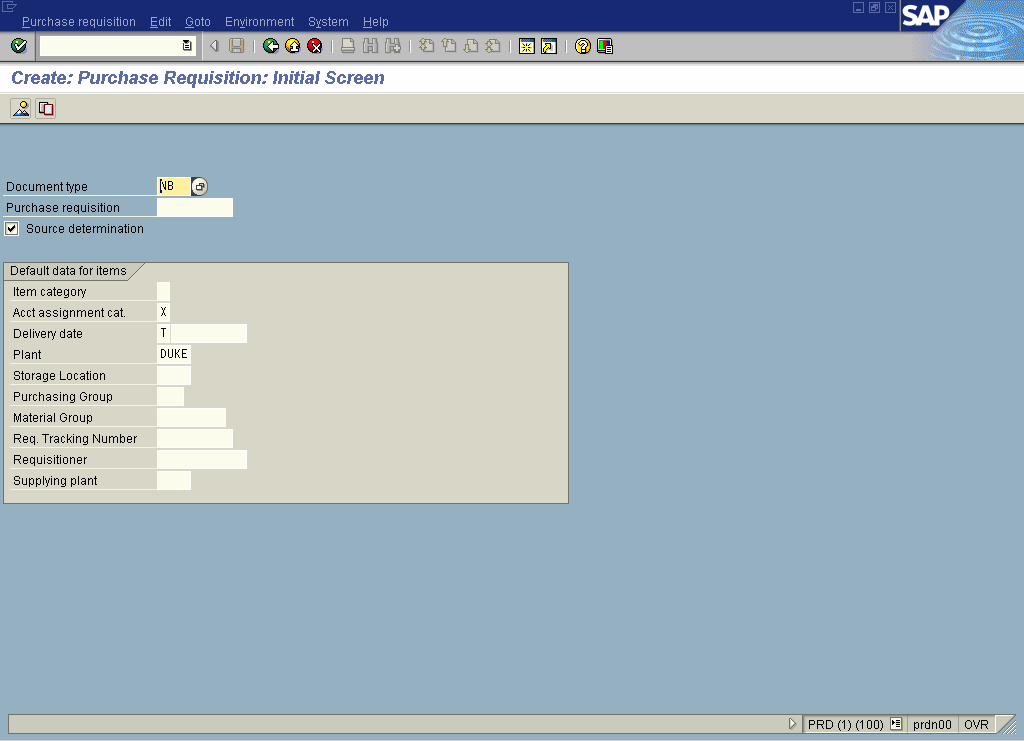
The Quick reference on Purchase Requisition will provide you all the steps in:
- Create Purchase Requisition for Non-Stock Materials- ME51N
- Create a Purchase Requisition for Services – ME51N
- Change a Purchase Requisition – ME52N
- Display a Purchase Requisition – ME53N
- List Purchase Requisitions- General Display – ME5A
- List Purchase Requisitions- General Display – ME5K
- List Purchase Requisitions- By Service – MSRV2
- Display a Purchase Requisition – ME53N
- Reject a Purchase Requisition – ME54N
- Change a Purchase Requisition – ME52N
- Release a Purchase Requisition – ME54N
Download the Quick Reference on Purchase Requisiton (3604).
If you like this post, you may as well like these too:
- Difference between a Purchase Order and a Purchase Requisition A Purchase Requisition is a document type that gives notification of a need for materials or services. A Purchase Order is a document type that is a formal request for...
- Purchase Requisition and Purchase Order Purchase requisition An SAP Purchase Requisition document is created electronically by a department (purchasing group) to request the purchase of goods or services. The approvals for the requisition are also...
- Purchase Requisition… How to? Quick How to tips on Purchase Requisition Creating A Purchase Requisition Use Transaction ME51N Searching for “des vendor” in Item Overview portion of screen Finding Vendor Address Ordering for grant...
- Purchase Requisition Processing A request for purchase is a purchase requisition or instruction to buy a certain quantity of a material or service to be available at a certain point in time. Learn...
- How to change a Purchase Requisition after it has been created? Use Transaction ME52N. Check to see if the PR has already had a PO issued against it. If so, you must inform the Purchasing Group. Check if the PR has...
- Accounts Payable Quick Reference This quick reference manual on Accounts Payable assists you with steps on : Change Parked Document – FBV2 Display Parked Document – FBV3 Post/Delete a parked Document – FV60 Post...
- Vendor Management Quick Reference The Quick reference on Vendor Management will provide you all the steps in: Create a Vendor Master Record– XK01 Change a Vendor Master Record – XK02 Display Vendor Master Record...
- Invoice Verification Quick Reference The Quick reference on Invoice Verification will provide you all the steps on: Enter Incoming Invoice referencing a PO – MIRO Display Invoice Document – MIR4 Display List of Invoice...
- Fixed Assets Quick Reference The Quick reference on Fixed Assets will provide you all the steps in: Creating an Asset Master Data – AS01 Create Asset Master Data Category-Leasing/Insurance Depreciation- AS01 Change Asset Master...
- Bank Accounting Quick Reference The Quick reference on Bank Accounting will provide you all the steps in: Create Bank Master Data – FI01 Change Bank Master Data – FI02 Display Bank Master Record –...
- Assessment Process – Quick Reference This quick reference on Assessment Process will walk you through; Define Assessment – KSU1 / KSU2 / KSU3 Execute Assessment Cycle Items – KSU5 Download the Quick Reference on...
- Quick Reference Guide for CATT Here is the PDF file which gives you quick access to all the key functions in CATT. This provides you with a quick overview on all the relevant functions of:...
- Quick Reference Guide on CATT Variants Another useful guide on CATT Variants. CATT variants are used to store assorted transactional combinations and/or field settings on a recorded CATT transaction to meet diverse SAP testing requirements. This...
- Profit Center Group – Quick Reference The Quick reference on Profit Center Group will provide you all the steps in: Create Profit Center Group – KCH1 Change Profit Center Group – KCH2 Display Profit Center Group...
- Material Returns without Reference to Purchase Order Assuming that you have raw materials that have been in the store for periods of time. A few months later, some were found to be defective. So you need to...


Leave a Reply